相关文章  
  • 新手入门之认识典型Web服务器(图)
  • 资深网管教你WIN2K下如何一机多站一(图)
  • 资深网管教你WIN2K下如何一机多站二(图)
  • 用Web UI远程管理Win 2003服务器
  • 在IIS6中新增可下载文件类型
  • Mobile Ink Jots 3:在 Web 上写写画画
  • 自己动手抠出2003中的IIS6安装程序
  • Windows Server 2003的Web接口问题
  • 为防火墙客户和Web代理客户配置自动发现
  • IIS5_IDQ命令行溢出程序源代码
  •   推荐  
      科普之友首页   专利     科普      动物      植物        天文   考古   前沿科技
     您现在的位置在:  首页 >>文献 >>培训

    在托管主机单网卡环境下进行web发布(一)4

    3后)安装Microsoft loopback适配器。通过Add/Remove Hardware面板安装。
      
      1.在ISA 2004防火墙主机上,Start->Control Panel->Add Hardware
      
      2.点击Next,
      
      3.Is the hardware connected:Yes,I have already connected the hardware->Next
      
      4.The following hardware is already installed on your computer:Add a new hardware device->Next
      
      5.The wizard can help you install other hardware:Install the hardware that I manually select from a list(Advanced)->Next
      
      6.From the list below,select the type of hardware you are installing:Network adapters->Next
      
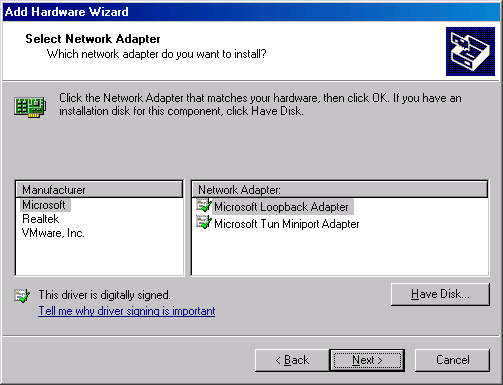
      7.Select Network Adapter:Microsoft-> Microsoft Loopback Adapter->Next


      8.The wizard is ready to install your hardware:

    页码:[1] [2] [3] [4] [5] [6] [7] [8]4页、共8页


          设为首页       |       加入收藏       |       广告服务       |       友情链接       |       版权申明      

    Copyriht 2007 - 2008 ©  科普之友 All right reserved
